

The Claude app for Windows brings Anthropic’s AI assistant directly to the desktop. Instead of depending completely on a browser tab. Windows users can install Claude Desktop and use Claude alongside local files, desktop tools, connected services, Claude Code, and Claude Cowork.
Claude has evolved considerably beyond a basic chatbot. The current desktop application combines regular conversations with tools for coding, research, file-based work, and multi-step tasks. Anthropic says the Claude Desktop App is available for Windows 10 and later. It also includes Windows on ARM64.
For users considering a Claude app for Windows 11, the answer is straightforward: yes. Windows 11 is supported because Anthropic officially supports Windows 10 and later. The more critical question is whether Claude’s special approach to AI productivity fits your workflow.
Today’s review looks at the Windows desktop experience of this application. In this review, we will provide an overview of features, requirements, pricing, privacy, limitations, etc. Also, we will discuss how Claude compares with alternatives such as ChatGPT, Gemini, and Microsoft Copilot.
What is Claude AI?
Claude is a large language model and AI assistant developed by Anthropic. Anthropic describes Claude as an assistant developed to be helpful, honest, and harmless, with a conversational interface. It helps you with tasks ranging from everyday questions to complex professional work.
This App can write and edit content, analyze information, generate code, etc. It works with files, searches the web, creates files, executes code, and supports more advanced workflows depending on the user’s plan. The current desktop app experience also includes Claude Cowork and Claude Code for paid users.
Who owns Claude AI? This question is on the minds of many peple. It is developed and operated by Anthropic, a Public Benefit Corporation.
Anthropic was founded by Dario Amodei, Daniela Amodei, and other AI researchers. Amazon is a significant minority investor and strategic technology partner, but Claude is an Anthropic product rather than an Amazon-owned chatbot. Anthropic’s governance also includes its Long-Term Benefit Trust.
Claude’s Key Features
AI chat and reasoning
The standard Claude experience handles questions, brainstorming, writing, analysis, coding, and other text-based tasks. Its user-friendly design makes it easy for beginners to start with natural-language prompts. It still provides powerful tools that professionals can use for more demanding work.
Its current model family includes Sonnet, Opus, and other models. These all help balance capability, speed, and cost. Anthropic introduced Claude Sonnet 5 in June 2026 and describes it as a high-performance model for coding, agents, and professional work.
Claude Cowork
Cowork is one of the most significant features of the modern desktop app. It allows paid users to delegate larger tasks to Claude. This includes work involving local files, connected tools, research, and document creation.
On Windows, Cowork requires the latest Claude App version and uses the Windows Virtual Machine Platform. This makes Cowork more suitable for multi-step projects than ordinary chat.
For example, a professional might give Claude a folder that contains many project documents and ask it to analyze the material and produce a structured deliverable.
Claude Code
Developers can access Claude Code from the desktop application. It is designed for software development tasks such as understanding codebases, making changes, testing, and working through development workflows.
Anthropic says Claude Code is available on Windows, macOS, and Linux. The desktop app provides an integrated environment alongside the other modes.
Local files and desktop extensions
Users can connect to local tools and files through desktop extensions. Anthropic explains these extensions as installable packages that can connect Claude with desktop applications and local data.
This can be specifically useful for users who work with documents, development projects, calendars, or other desktop resources and want Claude to work with that information without manually uploading everything.
Web search
It can search the web, giving users access to current information rather than relying only on the model’s existing knowledge.
Web search is available in the Claude product and is included among the capabilities listed on Anthropic’s current pricing page.
Projects and memory
Claude App For PC supports projects for organizing related work and maintaining relevant context. The desktop experience brings chats, projects, Cowork sessions, and artifacts together in one interface. However, Claude Code projects remain separate.
Artifacts and file creation
This app can create and work with files and interactive outputs. Anthropic’s current Free plan description includes the ability to create files and execute code. However, Paid plans expand access to additional capabilities.
Computer use
Claude Cowork and Claude Code can use the computer in supported scenarios. Anthropic explains this as a research-preview capability. In this way, Claude can interact with applications, click, type, open files, and work through a graphical interface when a direct connector is unavailable.
This capability can make changes to a user’s computer. Also, Anthropic provides permission controls and warns that computer-use functionality is still in its early stages.
Claude’s User Interface & Experience
The Claude app for Windows is created around three main experiences: Chat, Cowork, and Code. Anthropic’s current desktop documentation says these modes share the main Home area. But Claude Code sessions and projects remain separate.
For beginners, Chat is the natural starting point. The interface is relatively simple: For example, just ask a question, attach relevant material, and review Claude’s response.
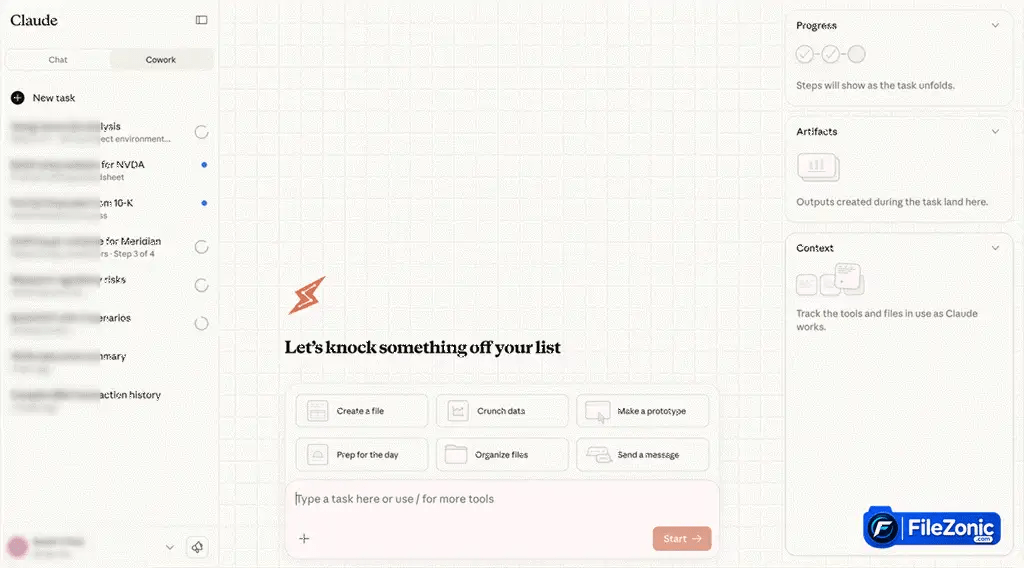
Professionals get more value from the additional modes. Cowork provides a workspace for delegating longer tasks, while Claude Code is aimed at software development.
The desktop version also has a benefit over simply opening Claude in a browser. Anthropic says the desktop app supports desktop extensions that can connect Claude to local file systems, browsers, and native applications.
One limitation is that not every desktop feature is identical across operating systems. For example, Anthropic’s Quick Entry feature currently remains macOS-only. So Windows users should not expect every shortcut and interface feature shown in Mac demonstrations.
Claude App System Requirements
Anthropic officially specifies Windows 10 or later for the desktop application. The official download page also provides separate Windows and Windows ARM64 downloads.
| Requirement | Official information |
| Windows 11 | Supported |
| Architecture | x64 and ARM64 |
| Processor | N/A |
| RAM | N/A |
| Storage | N/A |
| GPU | N/A |
| Internet connection | Required for Claude’s cloud-based services |
| Virtual Machine Platform | Required for Cowork on Windows |
Claude’s Performance
Claude’s AI processing is primarily cloud-based. So the desktop application’s response speed is influenced heavily by internet connectivity.
This means a powerful gaming PC does not automatically make Claude’s answers faster. Local hardware becomes more relevant for desktop features such as Cowork’s virtualized environment and other local operations.
Also, Anthropic has continued expanding its features and model capabilities. Recently, the company has announced major expansions involving Amazon AWS, Google Cloud, NVIDIA hardware, etc.
No independent FileZonic benchmark was performed for this review, so specific response-time or CPU/RAM performance figures are not claimed.
Claude’s Security & Privacy
Privacy is specifically important when an AI assistant can work with local files and desktop applications.
Anthropic says users can select whether to allow chats and coding sessions to be used to improve claude app for Windows. Certain safety-review circumstances and explicitly submitted feedback can also result in data being used for model improvement.
Anthropic also states that data is encrypted in transit and at rest and that employee access to conversations is restricted. They can access it only in circumstances such as explicit user consent for feedback or trust-and-safety review.
For commercial offerings such as Team and Enterprise, Anthropic says customer content is not used for model training by default.
Users should nevertheless treat AI services like other cloud applications. Do not provide confidential information unless your organization’s policies and the applicable Anthropic plan permit that use.
Anthropic Privacy Center
Anthropic Consumer Terms of Service
Claude’s Real-World Use Cases
Students
It can help explain difficult concepts, review writing, summarize supplied documents, and assist with coding exercises. Users should treat AI-generated explanations as assistance rather than automatically correct answers.
Professionals
For office work, the Claude app for Windows can help analyze documents, draft material, organize information, research topics, and create files. Cowork becomes specifically relevant when a task involves multiple files or steps.
Developers
Claude Code is one of the strongest reasons for developers to consider this application. It can work directly with codebases and development workflows without limiting the interaction to isolated code snippets.
Researchers
The application provides long-context capabilities, research tools, file analysis, and project organization. These features can make it useful for managing large amounts of information.
Businesses
Team and Enterprise plans provide many deployment features such as centralized management, connectors, security controls, and organizational management. Enterprise also provides spend controls and additional compliance features.
Claude vs ChatGPT: Is Claude better than ChatGPT?
There is no universal winner. Claude app for Windows is especially compelling for long-form reasoning, coding, document work, and agentic desktop workflows.
ChatGPT offers an all-around ecosystem for conversation, research, coding, multimodal features, and integrations. The more suitable choice depends on which tools and workflows matter most for you.
Gemini vs. Claude
Gemini is especially appealing to users who are heavy users of Google services like Google Drive, Gmail, YouTube, Calendar, etc. In contrast, it is all about professional work, coding, and desktop workflows.
Copilot vs. Claude
If you’re deeply embedded in Windows and Microsoft 365, Copilot is the clear choice.
On the other hand, this application can be the more flexible choice for users who want a general AI assistant. Also, it provides strong coding and local workflow capabilities.
Who Should Use Claude AI?
This Application is best suited to users who want more than a browser-based chatbot.
- Professionals can use it for research, writing, analysis, and document workflows.
- Developers have a strong reason to consider it because Claude Code is integrated into the broader App experience.
- Team and Enterprise administration, connectors, deployment options, and security controls can benefit businesses.
- Students and casual users can also benefit from the Free plan. However, they should remember that Anthropic currently requires users to be at least 18 years old to access Claude.
Users who only need occasional AI answers may find the browser version sufficient. The desktop application becomes more convincing when local files, coding, desktop extensions, or Cowork are part of the workflow.
Conclusion
The Claude app for Windows has matured into considerably more than a desktop chatbot. Anthropic’s Windows app currently mixes regular conversations with Claude with desktop extensions, such as Claude Code, local workflows, and Cowork, making it a more general AI productivity environment.
Windows 10 and Windows 11 users are officially supported, and ARM64 systems have a dedicated download. The Free plan also makes it possible to try Claude without immediately buying a subscription.
The biggest limitations are equally clear. Advanced functionality is tied to paid plans, Cowork has additional Windows virtualization requirements, and some desktop features remain platform-specific. It also does not provide traditional AI image generation.
The Desktop App is one of the more skillful AI applications out there for developers, researchers, professionals, and Windows users who want to interact with files and more complex workflows with AI. So if you just want to use the chatbot, the browser version should be fine.


