

If you’re starting a YouTube channel, making a podcast, editing music or just cleaning up voice recordings, you’ve probably heard the name Audacity. It’s the most well-known and powerful free program for audio editing.
But the question is, does it still make sense to use it in 2026? Also, some users are confused: Can a fully free program really replace paid software like Adobe Audition or Reaper?
Today, we will explore its powerful features, performance, and simple interface. Also, we provide real-world usability, which you must know.
Audacity Meaning
Many beginner users wonder about the meaning of Audacity before downloading the software. Audacity is a word for boldness, courage, or confidence to do something difficult. But its name is not related directly to audio editing.
It shows the project’s goal of providing useful professional tools to everyone at no cost. Today, this software has become almost synonymous with free audio editing.
What is Audacity Software?
The program is completely open-source for Windows, macOS, and Linux with features such as a multi-track audio editor and recorder.
Also, it offers many powerful features, such as recording audio, editing recordings, and removing background noise.
The software also offers many effects, mixing multiple tracks, and exporting files in multiple supported audio formats.
Unlike many paid audio editors, Audacity does not demand a subscription plan.
Whether you’re:
- Creating videos for the YouTube channel and other platforms.
- Recording podcasts.
- Editing interview videos.
- Digitizing vinyl records.
- Creating music.
- Cleaning and enhancing microphone recordings.
This tool can handle all these tasks surprisingly satisfactorily.
Audacity Download For Windows
If you want to download Audacity safely and securely, then you should go to the official website or filezonic.com.
Currently, the newer official release is available for Windows, macOS, and Linux. Also, the official website offers old versions, beta releases, manuals, and FFmpeg downloads.
Always download the Audacity audio editor from its official website or FileZonic to avoid modified installers from third-party sources.
First Impressions of Audacity
The first interesting thing you will notice when you open this software is that it doesn’t try to impress with flashy animations. Instead, it focuses on functionality.
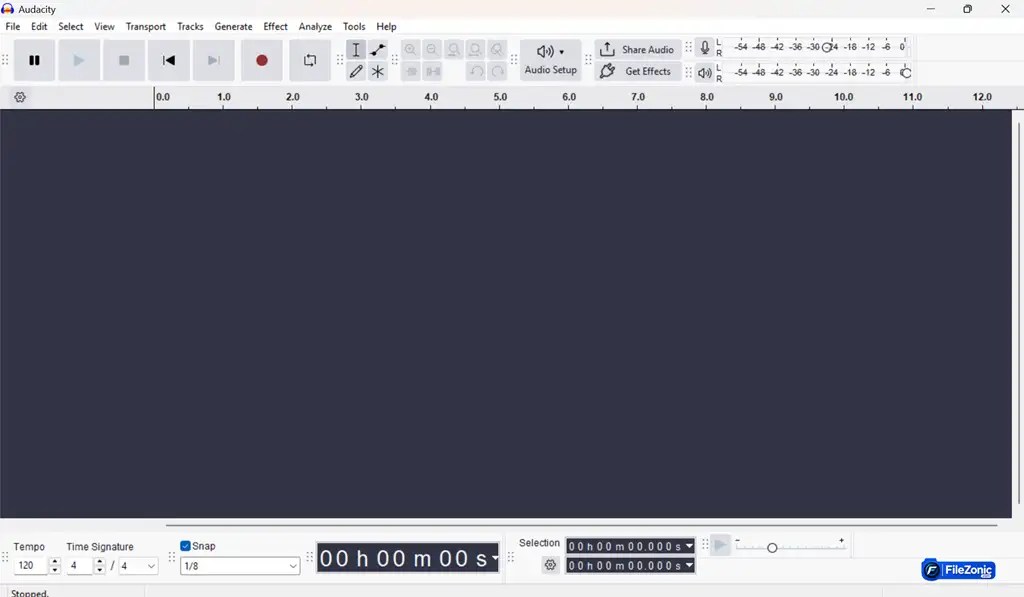
You may realize that the interface looks a little outdated compared to modern editing software. But all editing tools are logically organized.
Across the top of the dashboard, you will easily find:
- Recording control tools.
- Playback control tools.
- Editing tools.
- Timeline
- Waveforms
- Effects
- Export options
Once you spend 15–20 minutes learning the basics, navigation becomes surprisingly intuitive.
Audacity Audio Editor Features
The biggest reason millions of people around the world continue using this software is its impressive, powerful features.
1. Multi-track Audio Editing
Users can easily record or import multiple audio tracks and edit them independently.
This is perfect for:
- Podcasts
- Music production
- Voice-over projects
- Interviews
2. Audio Recording
This software can record directly from:
- USB microphones
- Internal microphones
- Audio interfaces
- Mixer devices
Also, it supports professional-quality recording without any extra software.
3. Noise Reduction
Its best-known powerful feature is Noise Reduction.
If your recording contains:
- Fan noise
- AC sounds
- Background hum
- Room noise
Then this software can significantly reduce the noise from audio. So, many YouTubers use this feature daily.
4. Hundreds of Audio Effects
Built-in effects include:
- Normalize
- Compressor
- Bass Boost
- Treble Boost
- Low Rollof to speech
- Limiter
- Equalizer
- Bass & Treble
- Fade In
- Fade Out
- Echo
- Reverb
- Pitch Change
- Speed Change
Also, this program supports third-party plugins like VST, LV2, LADSPA, and Audio Units.
5. Spectrogram View
Advanced users can easily switch waveform visualization into spectrogram mode. It helps users to identify unwanted frequencies and perform detailed audio restoration.
6. Plugin Support
One major strength of Audacity is plugin compatibility.
Professional and advanced users can extend functionality using hundreds of free and paid plugins.
Performance
Considering it’s totally free and open source software, its performance is excellent.
During testing:
- Audio imported quickly.
- Editing remained responsive.
- Large projects opened smoothly.
- Export speeds were fast.
Even older computers generally run this program comfortably because it does not consume excessive system resources of your computer.
Audio Formats Supported
It supports many audio formats, including:
- WAV
- MP3
- FLAC
- AIFF
- OGG
- PCM
With FFmpeg installed, you can also import and export many extra modern formats.
Best Uses for Audacity
Audacity works very well for:
- YouTube creators
- Students
- Teachers
- Podcasters
- Voice-over artists
- Musicians
- Online course creators
- Journalists
If you are mainly focused on editing speech or basic music projects, then it is hard to justify paying for costly software.
What Could Be Better?
No software is perfect. Audacity also has some limitations.
Interface
The interface feels outdated compared to premium editors.
Non-destructive Editing
The latest versions have improved workflows with real-time effects, but Audacity is not as flexible as some modern DAWs for every editing scenario.
Video Editing
This software is not designed for video editing. If you want to edit video, then you will need separate software like DaVinci Resolve or Filmora for complete video production.
MIDI Support
It does not replace a paid full music production software like FL Studio or Ableton Live.
Is Audacity Software Worth It?
Absolutely yes.
Considering it costs nothing, this software offers professional-level audio editing tools that many paid programs also offer.
However, this program can not replace a full digital audio paid program for advanced users. But for most users, it’s more than enough.
If you want to edit a podcast, enhance a voice recording, or create YouTube content. Then this tool is one of the best free options for you.
Conclusion:
If you want a free, trustworthy, lightweight audio editor with powerful features. Then Audacity is the best choice for you.
Its biggest strengths are its active development. Also, it offers an open-source nature and extensive plugin support. The program offers excellent recording and editing capabilities.
While the interface of this software could feel more modern. Still, the software’s functionality is easy and user-friendly. So, the program is best for beginners, YouTubers, podcasters, educators, students, and anyone requiring a powerful free audio editor.


