

Artificial Intelligence (AI) has quickly become a part of our lives because it helps us with many daily tasks. Whether you are writing emails, creating presentations, summarizing documents, or learning new topics, AI is working faster than ever. Also, you can generate code perfectly with the help of AI
One of the biggest names in the AI field is Google Gemini, developed by Google. It uses advanced AI models with Google’s powerful ecosystem. So it creates a powerful intelligent assistant that can help with writing, coding, research, image analysis, etc.
According to Google, this tool is designed with the company’s latest multimodal AI models for a personal, proactive, and powerful AI assistant.
What is Google Gemini?
Friends, if you search on the internet for the keyword “what is Google Gemini”, here you can see the simple answer.
Google Gemini is the AI assistant of Google; it understands your texts, images, documents, audio, and other types of content.
Unlike traditional chatbots, this tool uses multimodal AI. So you can work with different forms of information rather than just text.
Users can use the Gemini tool to:
- Write articles and emails.
- Create programming code. It is very helpful for developers.
- If you are a student, then solve math problems
- You can summarize PDFs and other documents.
- Easily analyze spreadsheets.
- Easily create travel plans.
- If you are interested in business, then it helps find the right business ideas.
- Learn new concepts and ideas.
- Generate images (supported plans/features).
- Translate languages.
Also, Google continually improves Gemini with new AI models. It also provides powerful features, so it is one of the fastest-growing AI assistants available.
Google Gemini Download for Windows
Many people search for Google Gemini download for Windows. Here’s something important to know. Currently, Google does not offer a Windows desktop software or app (.exe) for Gemini.
Instead, you can access this tool through:
- The official Gemini website.
- Google Chrome.
- Microsoft Edge.
This gives you a desktop-like experience without needing a separate software installer.
Google Gemini First Impressions
The interface is very clean, modern, and user-friendly. Unlike many AI tools filled with a dashboard of dozens of buttons. But Gemini provides a clean look and simple experience.
- Prompt box.
- Conversation history.
- File upload.
- Voice interaction (supported devices).
- Model selection (depending on plan).
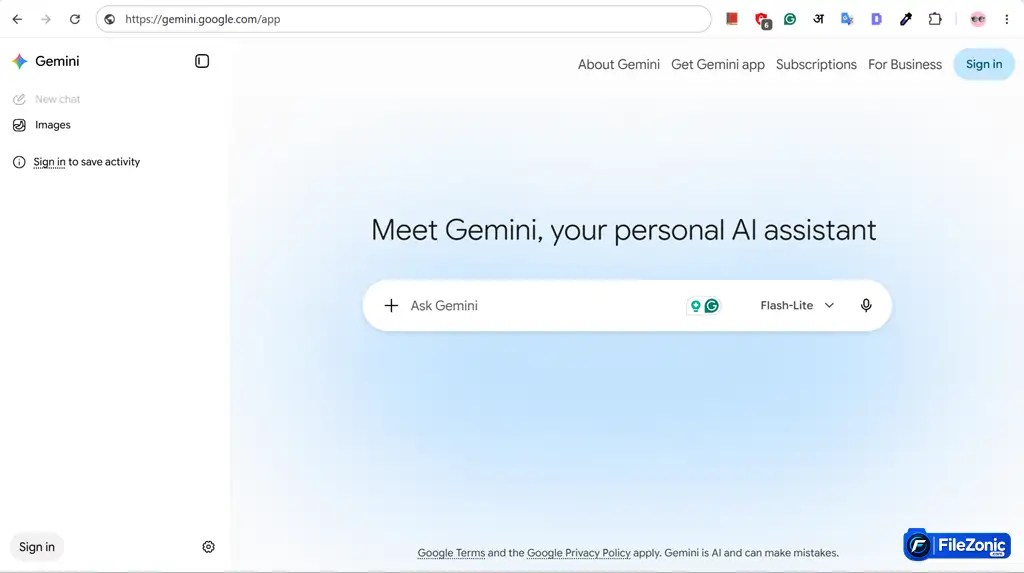
Every part of the tool is designed so any beginner can start using it instantly.
Key Features of Google Gemini
1. Powerful AI Models
Gemini uses Google’s latest family of AI models. It is developed for reasoning, creativity, coding, and multimodal tasks. Also, Google regularly updates these models to improve speed and quality from time to time.
2. Deep Google Workspace Integration
This is where Gemini shines. It works perfectly with many Google services such as:
- Gmail
- Google Docs
- Google Drive
- Google Calendar
- Google Photos
- YouTube
- Google Search
Thus, this makes your daily productivity tasks easier if you already use Google’s services.
3. File Analysis
This tool can also analyze many file formats easily, such as:
- PDFs
- Word documents
- Images
- Excel spreadsheets
- Presentations
Users just upload files and ask questions or request summaries. Also, you can extract important information from your files with just one click.
4. Gemini Live
This is an amazing feature because it allows natural voice conversations. This makes relations feel more like talking to a real assistant than typing into a chatbot. Also, you share screens and cameras for better context on supported devices.
5. Image Understanding
You can upload an image and ask any question about the image, such as:
- What’s shown?
- Explain this chart.
- Solve this math question.
- Describe this product.
- Extract text.
Thus, this tool works perfectly in picture understanding tasks.
6. Canvas & Deep Research
These are new features for joint work and Deep Research. It is helpful for long reports with many sources. Thus, it is useful for students, professionals, and researchers. Also, Google keeps expanding these powers.
Google Gemini vs. ChatGPT
One of the biggest questions today is Google Gemini VS ChatGPT. Here’s a practical comparison.
| Feature | Google Gemini | ChatGPT |
| Google Workspace Integration | ⭐⭐⭐⭐⭐ | ⭐⭐⭐ |
| Writing Quality | ⭐⭐⭐⭐☆ | ⭐⭐⭐⭐⭐ |
| Coding | ⭐⭐⭐⭐☆ | ⭐⭐⭐⭐⭐ |
| Web Knowledge | ⭐⭐⭐⭐⭐ | ⭐⭐⭐⭐⭐ |
| Image Analysis | ⭐⭐⭐⭐⭐ | ⭐⭐⭐⭐⭐ |
| Ease of Use | ⭐⭐⭐⭐⭐ | ⭐⭐⭐⭐⭐ |
| Productivity | ⭐⭐⭐⭐⭐ | ⭐⭐⭐⭐⭐ |
Choose Gemini if:
- You use Gmail daily.
- You store files in Google Drive.
- You use Google Docs.
- You rely on Google Search.
- You want better integration with Google’s services.
Choose ChatGPT if:
- You write long articles often.
- You need advanced coding help.
- You want a native desktop application for Windows.
- You depend on advanced custom GPTs and a wider ecosystem.
Finally, both are powerful AI tools. But the better choice depends on how you work.
Who Should Use Google Gemini?
This AI tool is ideal for:
- Students
- Teachers
- Bloggers
- Developers
- Business professionals
- Digital marketers
- Researchers
- Content creators
- Small business owners
Whether you’re studying, writing, coding, or planning projects, Gemini can save time and boost productivity.
What Could Be Better?
While the Gemini tool is great. It still has a few limitations.
1. No Native Windows Desktop App
Currently, Google does not offer a dedicated App for Windows. Users can access it through a browser.
2. Premium Features
If you want to use the most advanced features. Then, you require a paid Google AI subscription.
3. Internet Required
It is cloud-based, so you need an internet connection to use this tool.
Conclusion
Google Gemini has become one of the most skillful and powerful AI assistants available today. Its biggest strength is that users can easily integrate with Google’s services. If you use Gmail, Google Docs, Drive, Calendar, or Search, then Gemini is the perfect choice for you.
However, Google doesn’t provide any application for Windows, so it may disappoint some users. But you can use it easily via a web browser. Also, Google frequently makes improvements and adds new features from time to time.


